

Most professionals and students lose their best thinking hours not to laziness but to a calendar that was never designed to protect them. If you want to schedule deep work blocks automatically and actually have them stick, you need more than willpower and a colour-coded calendar. You need a system that fights back on your behalf. This guide walks you through the tools, configuration steps, and best practices that turn automated deep work scheduling from a nice idea into a reliable daily reality.
Table of Contents
- Key takeaways
- How to schedule deep work blocks automatically
- Configuring your automated deep work blocks
- Protecting your blocks from common pitfalls
- Measuring whether your automation is working
- My honest take on automated deep work scheduling
- Protect your focus time with Digital-guardian
- FAQ
Key takeaways
| Point | Details |
|---|---|
| Use the right tools | AI-powered schedulers like Morgen and Reclaim.ai auto-place and reshuffle deep work blocks without manual effort. |
| Set 90 to 120 minute blocks | Blocks shorter than 60 minutes rarely produce meaningful deep output; longer blocks yield the best results. |
| Mark blocks as "Busy" | Leaving blocks as "Free" invites colleagues and scheduling tools to book over them, defeating the purpose. |
| Schedule 60 to 70 per cent capacity | Leave slack in your calendar so automation stays resilient when urgent tasks appear. |
| Review and adjust weekly | Measure uninterrupted hours and completed deep tasks, then refine your templates and filters accordingly. |
How to schedule deep work blocks automatically
Before you touch a single setting, you need the right foundation. Automated deep work scheduling only works when your tools, calendar, and mindset are aligned. Rushing into configuration without this groundwork is why most people's "focus blocks" get cancelled by Wednesday.
The tools doing the heavy lifting in 2026 fall into two categories: AI-powered calendar assistants and automation workflow builders. On the AI assistant side, Morgen Frames let you create reusable time block templates and use an AI Planner to auto-schedule tasks based on filters like energy level and task tags. Tools like Reclaim.ai and Akiflow go further by reshuffling your calendar automatically as meetings or priorities shift, so your deep work blocks survive the chaos of a real workday. For advanced users, OpenClaw connects via API to create recurring "Deep Work" busy events using natural language instructions and cron jobs.
Calendar integration is non-negotiable. Whether you use Google Calendar or Outlook, your scheduling tool must read and write to your calendar in real time. Pair that with a task manager like Todoist, Notion, or Linear so your automation knows what to schedule, not just when.
Pro Tip: Before configuring any tool, block out your non-negotiable working hours and your peak energy windows. Most AI schedulers will respect these as hard constraints, which means your deep work lands when your brain is actually ready for it.
The right mindset matters too. Treat your deep work blocks the way you treat a flight. You do not reschedule a flight because someone wants a quick chat. That same non-negotiable framing is what makes automated scheduling work in practice, not just in theory.
Configuring your automated deep work blocks
With your tools connected, here is a step-by-step process to set up focused work sessions that run on autopilot.
-
Define your block duration. Research consistently shows that blocks of 90 to 120 minutes produce the best deep work output. Blocks under 60 minutes rarely generate meaningful progress. If your schedule allows, aim for one 90-minute block in the morning and one in the early afternoon.
-
Create reusable frame templates. In tools like Morgen, name your templates with specific outcomes rather than vague labels. "Write chapter 3 draft" is more useful than "Deep Work." Outcome-oriented block names reduce cognitive friction and create a lightweight commitment device that makes it easier to start the session.
-
Set your focus hours and buffer times. Define the windows when deep work is permitted and add 5 to 30 minute buffers before and after each block. This prevents meetings from bleeding into your focus time and gives you a transition period to mentally shift gears.
-
Apply task filters. Configure your AI scheduler to match tasks to blocks based on energy level, priority, and task type. High-cognitive tasks should land in your peak energy windows. Administrative or research tasks can fill lower-energy slots.
-
Configure automation rules. Set your tool to auto-schedule, reshuffle on conflict, and decline or move meetings that land inside protected blocks. Systems like Arahi AI can automatically decline or reschedule conflicting meetings, with buffer times of 5 to 30 minutes built in as a default.
-
Do your weekly setup in advance. Schedule blocks on Fridays or Sundays for the coming week. This gives your automation enough lead time to negotiate conflicts before Monday arrives.
Pro Tip: Separate your "planning" run from your "blocking" run. Advanced workflows first summarise your available schedule, then execute calendar updates in a second pass. This two-step approach, used in advanced automation workflows, significantly reduces scheduling errors.
Protecting your blocks from common pitfalls
Setting up automation is only half the job. The other half is stopping your blocks from quietly falling apart over time.

The single most common mistake is leaving deep work blocks marked as "Free." Marking blocks as "Busy" is non-negotiable. Otherwise, scheduling tools and well-meaning colleagues will book straight over them, and your automation becomes decorative.
Here are the most important defensive practices to build into your system:
- Communicate your focus windows. Tell your team which hours are protected. Most people respect boundaries when they understand them. A simple note in your calendar description or a shared team schedule is enough.
- Batch shallow work separately. Cal Newport's rhythmic approach recommends fixing 2 to 3 hour blocks at the same times daily and batching emails, Slack, and admin into clearly separate windows. This stops shallow tasks from colonising your deep work time.
- Cap your scheduled capacity at 60 to 70 per cent. Scheduling full weeks rigidly creates fragile calendars that collapse under the first urgent request. Leave breathing room so your automation can absorb the unexpected without breaking.
- Manage notifications during blocks. Turn on Do Not Disturb, close your inbox, and set your status to "Focusing" in Slack or Teams. Automation handles the calendar; you handle the environment.
"Automation is not just about filling calendar space but about proactive defence of focus time and continuous rescheduling to keep priorities intact." — Akiflow on calendar automation
One underrated tactic is naming your blocks with specific deliverables. "Review Q3 report" tells your future self exactly what the session is for. It also signals to anyone who sees your calendar that this is real, committed work, not a placeholder.
Measuring whether your automation is working
Configuring your system is not a one-time event. You need to check whether it is actually protecting your focus time, and adjust when it is not.
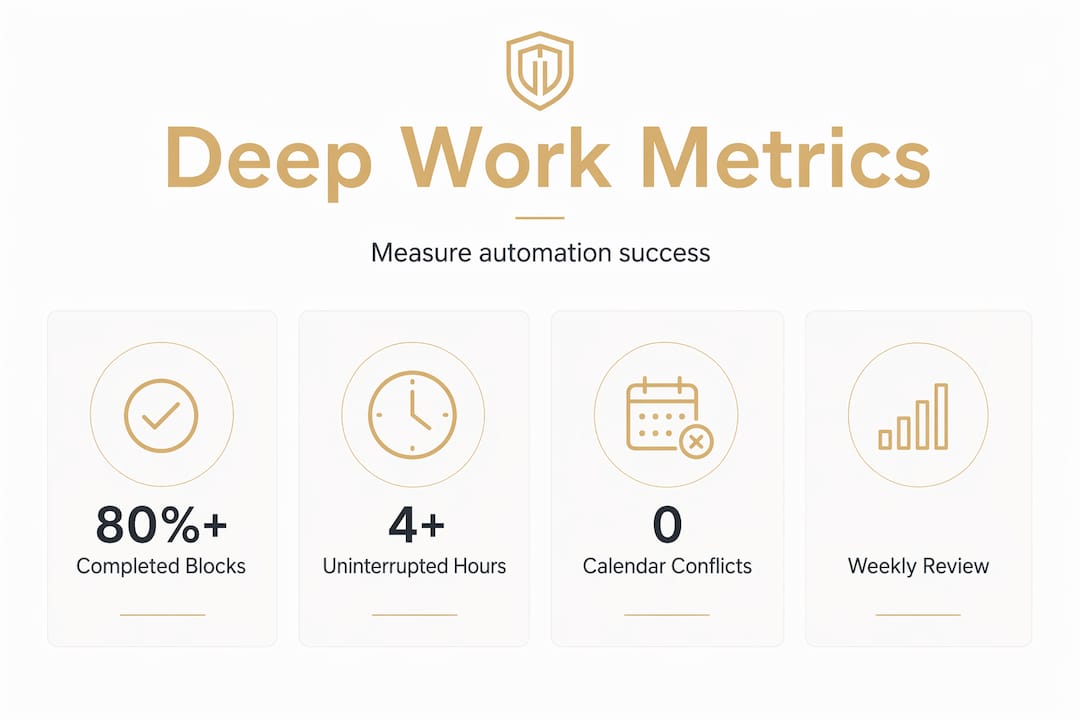
The table below outlines the key metrics worth tracking each week:
| Metric | What to measure | Target |
|---|---|---|
| Uninterrupted hours | Hours in deep work blocks with no meeting conflicts | 8 to 10 hours per week |
| Block completion rate | Percentage of scheduled blocks that ran as planned | Above 80 per cent |
| Rescheduling frequency | How often blocks were moved or cancelled | Fewer than 2 times per week |
| Deep task completion | Number of deep work tasks completed per week | Increasing trend over 4 weeks |
Review these numbers every Friday as part of your weekly setup ritual. If your block completion rate drops below 80 per cent, look at whether your capacity is overloaded, your buffers are too short, or a particular meeting type keeps clashing with your blocks.
Pro Tip: Connect your task manager to your scheduling tool so completed tasks automatically close out their associated blocks. This gives you a live view of deep work progress without any manual logging.
The goal is not perfect automation. It is a system that learns your patterns and gets better over time. Most AI scheduling tools improve their suggestions the longer you use them, so the first two weeks will feel rougher than week six. Stay with it.
My honest take on automated deep work scheduling
I have spent years watching smart people set up elaborate productivity systems that collapse within a fortnight. The problem is almost never the tool. It is the expectation that automation will do the thinking for you.
What I have learned is that the best automated scheduling setups are built on a clear personal decision made once: deep work is not optional. When you make that decision genuinely, the automation becomes an expression of it rather than a substitute for it. The tools enforce what you have already committed to.
I have also seen people over-automate to the point where their calendar feels like it belongs to a robot. The sweet spot is 60 to 70 per cent planned capacity, with human override available for anything that genuinely warrants it. Automation should make your schedule feel protected, not imprisoned.
The shift I find most transformative is moving from reactive scheduling (fitting deep work around meetings) to proactive scheduling (fitting meetings around deep work). That inversion sounds small. In practice, it changes everything about how your week feels and what you actually produce.
Start simple. One reusable block template, one AI scheduler, one weekly review. Add complexity only when the basics are running smoothly. The professionals and students I have seen succeed with this are not the ones with the most sophisticated setups. They are the ones who defended their focus time with quiet consistency.
— Darcy
Protect your focus time with Digital-guardian
Managing work blocks efficiently requires more than a good calendar app. It requires a system that actively guards your attention across every layer of your digital life. The Digital Guardian Suite was built for exactly this. It unifies productivity automation, distraction management, and calendar protection into one coherent platform that runs quietly in the background while you work in the foreground. Whether you are setting up productivity blocks for a study sprint or defending a three-hour writing session from Slack notifications, Digital-guardian gives you the infrastructure to make those blocks real. Stop letting your calendar be a passive record of other people's priorities. Let it become an active guardian of yours.
FAQ
What is the best duration for a deep work block?
Blocks of 90 to 120 minutes consistently produce the best deep work output. Blocks under 60 minutes rarely generate meaningful progress on complex tasks.
How do I stop meetings from overwriting my deep work blocks?
Mark all deep work blocks as "Busy" in your calendar and configure your scheduling tool to decline or reschedule conflicting meetings automatically. Communicating your focus windows to your team adds an additional layer of protection.
Which tools are best for automated deep work scheduling?
Morgen, Reclaim.ai, and Akiflow are the leading options for automated deep work scheduling in 2026. Each integrates with Google Calendar and Outlook and offers AI-driven rescheduling when conflicts arise.
How much of my calendar should I block for deep work?
Schedule deep work and other planned tasks across 60 to 70 per cent of your available hours. Leaving 30 to 40 per cent unscheduled gives your automation room to handle urgent or unexpected tasks without breaking your focus blocks.
How do I know if my automated scheduling is actually working?
Track your block completion rate each week. If more than 80 per cent of your scheduled deep work blocks run as planned without being moved or cancelled, your system is working. If not, review your capacity load, buffer settings, and meeting conflict rules.