

Most people assume public wifi is either completely safe or completely dangerous. Neither is true. Public wifi security has genuinely improved over the last decade, largely because HTTPS now protects the content of most web traffic by default. But that does not mean you can connect to any network at the airport and relax. The real threats in 2026 are not passive eavesdroppers reading your emails. They are fake networks, rogue hotspots, and scam portals designed to steal your credentials before you even open a browser tab.
Table of Contents
- Key takeaways
- Real public wifi risks in 2026
- How to secure your connection on public wifi
- Handling sensitive tasks and responding to compromise
- Public wifi versus mobile hotspots: when to use each
- Device hygiene habits that protect you consistently
- My take on public wifi security
- Protect your data beyond the network
- FAQ
Key takeaways
| Point | Details |
|---|---|
| HTTPS helps but does not protect everything | Encrypted sites reduce eavesdropping but cannot protect you from connecting to a fake or malicious network. |
| Use a VPN before you connect | Activating your VPN prior to joining a public network prevents traffic exposure during the initial connection phase. |
| Disable auto-connect on all devices | Devices that silently join known networks are vulnerable to evil twin attacks and SSID spoofing. |
| Avoid sensitive tasks on public wifi | Banking, corporate logins, and confidential file transfers should use a mobile hotspot or trusted private network. |
| Incident response matters as much as prevention | If you suspect compromise, change passwords immediately, review account activity, and enable multi-factor authentication. |
Real public wifi risks in 2026
The threat model for public wifi has shifted. A few years ago, the primary concern was packet sniffing, where someone on the same network could intercept unencrypted traffic. The FTC confirms public wifi is generally safer now due to widespread HTTPS adoption, but warns that an encrypted site is not automatically a trustworthy one.
The bigger risks today are active and deliberate:
- Evil twin attacks. A criminal sets up a hotspot with a name almost identical to the legitimate one. "Airport_Free_WiFi" and "Airport_Free_WiFi_2" look the same on your phone. Once you connect, all your traffic routes through their device.
- DNS hijacking. Even on a real network, a compromised router can redirect your DNS queries, sending you to a fake version of your bank's website. Malicious networks redirect via DNS hijacking and use fake certificate errors to harvest credentials.
- Fake captive portals. You connect to a network, a login page appears, and you enter your email and a password. That portal is controlled by an attacker. Many people reuse passwords, which makes this trivially effective.
- Man-in-the-middle (MITM) attacks. Less common now due to HTTPS, but still viable on networks using older TLS configurations or when users click through certificate warnings.
Even when HTTPS protects the content of your browsing, metadata remains exposed. The domains you visit, the duration of your sessions, and the volume of data you transfer can all be observed on a public network. That information alone can reveal a great deal about your behaviour and intentions.
The shift from passive eavesdropping to active fraud means account hardening matters as much as connection hygiene. Public wifi risk has moved toward scams and credential theft rather than traffic interception.
How to secure your connection on public wifi
Protecting yourself on public wifi is not complicated, but it does require doing several things in the right order and making them habits rather than one-off actions.
- Activate your VPN before connecting. This is the detail most guides miss. Enabling VPN after connecting exposes your device during the network association phase, which is when attacks often occur. Open your VPN app first, then join the network.
- Verify the network name physically. Ask staff for the exact SSID. Do not guess, and do not pick the strongest signal. Devices auto-connecting silently to unverified networks are the primary vector for evil twin attacks.
- Check for HTTPS and understand its limits. The padlock icon confirms your connection to the site is encrypted. It does not confirm the site itself is legitimate. A phishing page can have a valid SSL certificate.
- Enable DNS over HTTPS (DoH). Most modern browsers support this in their settings. DoH encrypts your DNS queries, which prevents a compromised router from redirecting you to fake sites. It takes about 30 seconds to turn on and significantly reduces one of the most underrated risks on public networks.
- Keep your operating system, browser, and security software updated. Automatic updates add vital protection against malware that exploits known vulnerabilities. Unpatched devices on public networks are low-hanging fruit.
- Use strong, unique passwords and enable two-factor authentication (2FA) on every account that supports it. If a fake portal does capture your credentials, 2FA is the last line of defence that prevents immediate account takeover.
Pro Tip: Set your phone to "Ask to Join Networks" rather than automatically connecting. This single setting change prevents your device from silently joining any network that matches a name it has seen before, including attacker-controlled ones.
After you leave a public network, forget it on your device. Forgetting networks and disabling auto-connect reduces the risk of your device reconnecting without your knowledge the next time you are nearby.

Handling sensitive tasks and responding to compromise
Not every activity carries the same risk on public wifi. Checking the news or streaming music is low stakes. Logging into your work systems or completing a bank transfer is not.
Here is how to think about what belongs on public wifi and what does not:
- Avoid entirely on public wifi: internet banking, corporate VPN access beyond your personal VPN, tax portals, payroll systems, and any service where a compromised login causes serious harm.
- Acceptable with precautions: general browsing, social media, email (with 2FA active), streaming, and read-only access to low-sensitivity accounts.
- Always use a mobile hotspot for: anything involving financial transactions, confidential client data, or work systems that hold personal information about others.
Using a mobile hotspot for sensitive transactions limits your exposure to public network threats entirely. It costs a small amount of data but removes a significant category of risk.
Pro Tip: If you receive an unexpected MFA prompt while on public wifi, treat it as a red flag. Someone may be attempting to log into your account using credentials they just captured. Do not approve the prompt. Disconnect immediately and change the relevant password from a trusted network.
If you suspect your device or accounts were compromised after using public wifi, act quickly. Immediate disconnect and password change is the first step, followed by reviewing account activity for anything unauthorised. If you accessed work systems, notify your IT department regardless of whether you see obvious signs of compromise. Waiting to be sure costs more than acting early.
Public wifi versus mobile hotspots: when to use each
Understanding the difference between your options helps you make the right call quickly, without overthinking it.
| Connection type | Security level | Best for | Avoid for |
|---|---|---|---|
| Public wifi (café, hotel) | Low to moderate | General browsing, streaming, low-risk tasks | Banking, work logins, sensitive file transfers |
| Airport or transit wifi | Low | Brief, non-sensitive browsing only | Any account access or data entry |
| Home or office network | High | All activities | N/A |
| Mobile hotspot (4G/5G) | High | Sensitive transactions, work access | Extended use on limited data plans |
| VPN over public wifi | Moderate to high | Most tasks when mobile data unavailable | Situations requiring maximum security |
The risk level of a public wifi network also varies by location. A café you visit regularly, where you can verify the SSID with staff, carries less risk than an unnamed network at a transit hub. Hotels are a particular grey area. Their networks are often poorly maintained and shared with hundreds of guests, making them closer to airport wifi in terms of risk than to a home network.
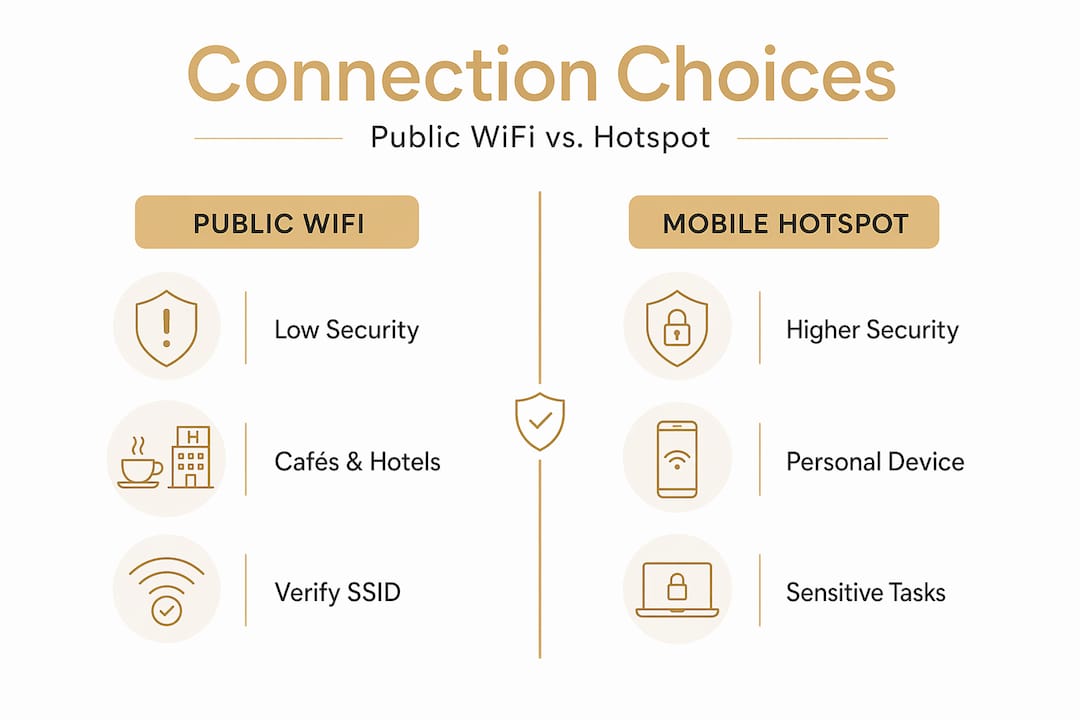
Physical confirmation of the SSID matters more than people realise. SSID spoofing attacks rely on user consent. If you ask the barista for the wifi name and it matches what you see on your device, you have already eliminated one of the most common attack vectors.
Device hygiene habits that protect you consistently
The best public wifi network security is not a product you buy once. It is a set of habits you maintain. These are the ones that matter most:
- Turn wifi off when you are not using it. Your device cannot connect to a malicious network if wifi is disabled. This is particularly worth doing in transit, in shopping centres, and anywhere you are not actively browsing.
- Enable "Ask to Join Networks" on your phone and laptop. This prevents automatic connections and gives you a moment to verify before joining.
- Use your device's firewall. On Windows, the built-in firewall should be active and set to "Public network" mode when you are away from home. On macOS, enable the firewall in System Settings under Network.
- Do not share files or enable AirDrop, Nearby Share, or similar features on public networks. These features can expose your device to other users on the same network.
- Regularly audit your saved networks. Delete any public or unfamiliar networks from your saved list. The fewer networks your device trusts automatically, the smaller your attack surface.
- Be sceptical of captive portals that ask for more than an email address. A portal requesting your phone number, date of birth, or password for another service is almost certainly a scam.
Consistent habits matter more than any single tool. A device that is always updated, never auto-connects, and routes traffic through a VPN on public networks is genuinely well protected against the threats that exist today.
My take on public wifi security
I have watched the conversation around public wifi security repeat the same cycle for years. Someone publishes a scare piece, people panic, and then nothing changes in their actual behaviour. The truth is more nuanced and, in some ways, more concerning than the headlines suggest.
What I have found is that most people underestimate one specific risk: the auto-join feature on their devices. It is not dramatic, it does not make headlines, but it is the mechanism that makes evil twin attacks so effective. Your phone has likely connected to dozens of networks you did not consciously choose. That is the real exposure.
My honest recommendation is to treat every public network as a Zero Trust environment. That means verifying before you connect, running a VPN without exception, and assuming that anything you do on a public network could theoretically be observed. That mindset does not require paranoia. It requires about three extra seconds of attention each time you connect.
The other thing I have learned is that post-session incident response matters more than perfect prevention. You will not always get the connection choice right. What separates people who recover quickly from those who suffer real harm is how fast they act when something feels wrong. Change the password. Enable MFA. Call the bank. Do not wait.
— Darcy
Protect your data beyond the network
Public wifi security is one layer of a much larger picture. If you are serious about protecting your personal and professional information, you need tools that work quietly in the background, not ones that demand constant attention.

Digital-guardian was built for exactly this. The Digital Guardian Suite brings together intelligent protection across your digital life, covering privacy, data security, and family safety in one coherent system. It runs in the background so you do not have to think about it, which is the point. Whether you are at a café, an airport lounge, or working remotely, Digital-guardian gives you a foundation of security that does not slow you down or ask more of you than you can give.
FAQ
Is public wifi safe to use in 2026?
Public wifi is generally safer than it was five years ago due to widespread HTTPS adoption, but risks from fake hotspots, DNS hijacking, and rogue networks remain real. Using a VPN and verifying the network name before connecting significantly reduces your exposure.
What is the biggest risk of using public wifi?
The biggest risk today is connecting to a fake or malicious network rather than passive eavesdropping. Evil twin hotspots and fake captive portals are designed to capture your credentials before you realise anything is wrong.
Do I really need a VPN on public wifi?
Yes, and you should activate it before joining the network. A VPN encrypts your traffic and prevents exposure during the connection setup phase, which is when many attacks occur.
What should I do if I think my account was compromised on public wifi?
Disconnect immediately, change the passwords for any accounts you accessed, and review recent account activity for unauthorised actions. If you used work systems, notify your IT department straight away.
Is a mobile hotspot safer than public wifi?
Yes. A mobile hotspot uses your cellular connection rather than a shared public network, which removes most of the risks associated with public wifi access. Use it for banking, work logins, and any task involving sensitive personal data.